Book your California DMV driving test
Browse Bay Area DMV test openings for the next 30 days. All times are Pacific. Book with the DMV, then reserve your test car separately.
Need a test car? Check rentals before booking.
Find a test + carBrowse DMV test times
Choose an office to see dates and times. Availability is not a reservation; confirm your appointment with the DMV.
These times are from an older DMV check and may have changed. Confirm with the DMV before booking.
Tue, Dec 1 – Mon, Dec 7
Tue, Dec 1
Afternoon
2:00 PM2:20 PM2:40 PMWed, Dec 2
Morning
10:00 AM10:20 AM10:40 AM11:00 AM11:20 AMAfternoon
1:00 PM1:20 PM1:40 PM2:00 PM2:20 PM2:40 PMThu, Dec 3
Morning
8:20 AM8:40 AM9:00 AM9:20 AM9:40 AM10:00 AM10:40 AM11:00 AM11:20 AMAfternoon
1:20 PM1:40 PM2:00 PM2:20 PM2:40 PM3:00 PMFri, Dec 4
Morning
8:40 AM9:40 AM10:00 AM10:20 AM10:40 AM11:00 AM11:20 AMAfternoon
1:00 PM1:20 PM1:40 PM2:00 PM2:20 PM2:40 PMMon, Dec 7
Morning
8:20 AM8:40 AM9:00 AM9:20 AM9:40 AM10:00 AM10:20 AM10:40 AM11:00 AM11:20 AMAfternoon
1:00 PM1:20 PM1:40 PM2:00 PM2:20 PM2:40 PM3:00 PM3:20 PM
These times are from an older DMV check and may have changed. Confirm with the DMV before booking.
Mon, Nov 16 – Sun, Nov 22
Mon, Nov 16
Morning
8:00 AM8:20 AM8:40 AM9:00 AM9:20 AM9:40 AM10:00 AM10:20 AM10:40 AM11:00 AM11:20 AMAfternoon
1:00 PM1:20 PM1:40 PM2:00 PM2:20 PM2:40 PM3:00 PM3:20 PMTue, Nov 17
Morning
8:20 AM8:40 AM9:00 AM9:40 AM10:00 AM10:20 AM10:40 AM11:00 AM11:20 AMAfternoon
1:00 PM1:20 PM1:40 PM2:00 PM2:20 PM2:40 PM3:00 PM3:20 PMWed, Nov 18
Morning
9:00 AM9:20 AM9:40 AM10:00 AM10:20 AM10:40 AM11:00 AM11:20 AMAfternoon
1:20 PM1:40 PM2:00 PM2:20 PM2:40 PM3:00 PM3:20 PM3:40 PMThu, Nov 19
Morning
8:00 AM8:20 AM8:40 AM9:00 AM9:20 AM9:40 AM10:00 AM10:20 AM10:40 AM11:00 AM11:20 AMAfternoon
1:00 PM1:20 PM1:40 PM2:00 PM2:20 PM2:40 PM3:00 PM3:20 PM3:40 PMFri, Nov 20
Morning
8:20 AM8:40 AM9:00 AM9:20 AM9:40 AM10:00 AM10:20 AM10:40 AM11:00 AM11:20 AMAfternoon
1:00 PM1:20 PM1:40 PM2:00 PM2:20 PM2:40 PM3:00 PM3:20 PM
These times are from an older DMV check and may have changed. Confirm with the DMV before booking.
Tue, Nov 17 – Mon, Nov 23
Tue, Nov 17
Morning
8:20 AM8:40 AM9:00 AM9:20 AM9:40 AM10:00 AM10:20 AM10:40 AM11:00 AM11:20 AMAfternoon
1:00 PM1:20 PM1:40 PM2:00 PM2:20 PM2:40 PM3:00 PM3:20 PMWed, Nov 18
Morning
9:00 AM9:20 AM9:40 AM10:00 AM10:20 AM10:40 AM11:00 AM11:20 AMAfternoon
1:00 PM1:20 PM1:40 PM2:00 PM2:20 PM2:40 PM3:00 PM3:40 PMThu, Nov 19
Morning
8:00 AM8:20 AM8:40 AM9:00 AM9:20 AM9:40 AM10:00 AM10:20 AM10:40 AM11:00 AM11:20 AMAfternoon
1:00 PM1:20 PM1:40 PM2:00 PM2:20 PM2:40 PM3:00 PM3:20 PM3:40 PMFri, Nov 20
Morning
8:20 AM8:40 AM10:00 AM10:20 AM10:40 AM11:00 AM11:20 AMAfternoon
1:00 PM1:20 PM1:40 PM2:00 PM2:20 PM2:40 PM3:00 PM3:20 PMMon, Nov 23
Morning
8:00 AM9:00 AM9:20 AM10:20 AM10:40 AM11:00 AM11:20 AMAfternoon
1:00 PM1:20 PM1:40 PM2:00 PM2:20 PM2:40 PM3:00 PM3:20 PM
These times are from an older DMV check and may have changed. Confirm with the DMV before booking.
Tue, Dec 1 – Mon, Dec 7
Tue, Dec 1
Morning
8:20 AM8:40 AM9:20 AM9:40 AM10:40 AMAfternoon
1:20 PM1:40 PM2:00 PM2:20 PM2:40 PM3:00 PMWed, Dec 2
Morning
10:00 AM10:20 AM10:40 AM11:00 AMAfternoon
1:20 PM1:40 PM2:00 PM2:20 PM2:40 PM3:00 PM3:20 PMThu, Dec 3
Morning
8:00 AM8:20 AM8:40 AM9:00 AM9:20 AM10:00 AM10:20 AM10:40 AM11:00 AM11:20 AMAfternoon
1:00 PM1:20 PM1:40 PM2:00 PM2:20 PM2:40 PM3:00 PMFri, Dec 4
Morning
8:00 AM8:20 AM8:40 AM9:20 AM10:00 AM10:20 AM10:40 AM11:20 AMAfternoon
1:00 PM1:20 PM1:40 PM2:00 PM2:20 PM2:40 PMMon, Dec 7
Morning
8:00 AM8:20 AM8:40 AM9:00 AM9:20 AM9:40 AM10:00 AM10:20 AM10:40 AM11:00 AM11:20 AMAfternoon
1:00 PM1:20 PM1:40 PM2:00 PM2:20 PM2:40 PM3:00 PM3:20 PM3:40 PM
These times are from an older DMV check and may have changed. Confirm with the DMV before booking.
Thu, Dec 3 – Wed, Dec 9
Thu, Dec 3
Afternoon
1:40 PM2:20 PMFri, Dec 4
Morning
9:20 AMMon, Dec 7
Morning
8:00 AM8:20 AM8:40 AM9:00 AM9:20 AM9:40 AM10:20 AM10:40 AM11:00 AM11:20 AMAfternoon
1:00 PM1:20 PM1:40 PM2:00 PM2:20 PM2:40 PM3:00 PM3:20 PMTue, Dec 8
Morning
8:00 AM8:20 AM8:40 AM9:00 AM9:20 AM9:40 AM10:20 AM10:40 AM11:00 AM11:20 AMAfternoon
1:40 PM2:00 PM2:20 PM2:40 PM3:00 PM3:20 PMWed, Dec 9
Morning
9:00 AM9:20 AM9:40 AM10:00 AM10:20 AM10:40 AM11:00 AM11:20 AMAfternoon
1:00 PM1:20 PM1:40 PM2:00 PM2:20 PM2:40 PM3:00 PM3:20 PM3:40 PM
These times are from an older DMV check and may have changed. Confirm with the DMV before booking.
Mon, Nov 23 – Sun, Nov 29
Mon, Nov 23
Afternoon
2:20 PM2:40 PMTue, Nov 24
Morning
9:40 AM10:40 AMAfternoon
1:20 PM2:00 PM2:20 PM2:40 PM3:00 PM3:20 PMWed, Nov 25
Afternoon
1:40 PM2:20 PM2:40 PM3:40 PM
These times are from an older DMV check and may have changed. Confirm with the DMV before booking.
Mon, Dec 7 – Sun, Dec 13
Mon, Dec 7
Morning
8:40 AM10:20 AMAfternoon
1:00 PM1:20 PM1:40 PM2:00 PM2:20 PM2:40 PM3:00 PMTue, Dec 8
Morning
8:00 AM8:20 AM8:40 AM9:00 AM9:20 AM10:20 AM10:40 AM11:00 AM11:20 AM11:40 AMAfternoon
1:00 PM1:20 PM1:40 PM2:00 PM2:20 PM2:40 PM3:00 PM3:20 PM3:40 PMWed, Dec 9
Morning
9:20 AM9:40 AM10:00 AM10:20 AM10:40 AM11:00 AM11:20 AM11:40 AMAfternoon
1:00 PM1:20 PM1:40 PM2:00 PM2:20 PM2:40 PM3:00 PM3:20 PM3:40 PM
These times are from an older DMV check and may have changed. Confirm with the DMV before booking.
Tue, Dec 1 – Mon, Dec 7
Tue, Dec 1
Morning
8:00 AM8:20 AM8:40 AM10:40 AMAfternoon
1:40 PM2:00 PM2:20 PM2:40 PMWed, Dec 2
Morning
9:40 AM10:00 AM10:20 AM10:40 AM11:00 AM11:20 AMAfternoon
1:00 PM1:20 PM1:40 PM2:00 PM2:20 PM2:40 PM3:00 PM3:40 PMThu, Dec 3
Morning
8:00 AM8:40 AM9:00 AM9:20 AM9:40 AM11:00 AMAfternoon
1:20 PM1:40 PM2:00 PM2:20 PM2:40 PM3:00 PMFri, Dec 4
Morning
8:00 AM8:40 AM9:20 AM9:40 AM10:20 AM11:00 AM11:20 AMAfternoon
1:20 PM1:40 PM2:00 PM2:20 PM2:40 PMMon, Dec 7
Morning
8:00 AM8:20 AM8:40 AM9:00 AM9:20 AM9:40 AM10:00 AM10:20 AM10:40 AM11:00 AM11:20 AMAfternoon
1:00 PM1:20 PM1:40 PM2:00 PM2:20 PM2:40 PM3:00 PM
These times are from an older DMV check and may have changed. Confirm with the DMV before booking.
Mon, Nov 16 – Sun, Nov 22
Mon, Nov 16
Afternoon
2:20 PM2:40 PMTue, Nov 17
Morning
8:00 AM8:20 AM8:40 AM9:00 AM9:20 AM9:40 AM10:00 AM10:40 AM11:00 AMAfternoon
1:00 PM1:20 PM1:40 PM2:00 PM2:20 PM2:40 PM3:40 PMWed, Nov 18
Morning
9:00 AM9:20 AM9:40 AM10:00 AM10:20 AM10:40 AM11:00 AM11:20 AMAfternoon
1:20 PM1:40 PM2:00 PM2:20 PM2:40 PMThu, Nov 19
Morning
8:00 AM8:20 AM8:40 AM9:00 AM9:20 AM9:40 AM10:20 AM10:40 AM11:20 AMAfternoon
1:00 PM1:20 PM1:40 PM2:00 PM2:20 PM2:40 PM3:20 PM3:40 PMFri, Nov 20
Morning
8:00 AM
These times are from an older DMV check and may have changed. Confirm with the DMV before booking.
Mon, Nov 16 – Sun, Nov 22
Mon, Nov 16
Morning
8:20 AM8:40 AMAfternoon
2:20 PM2:40 PM3:00 PMTue, Nov 17
Morning
8:00 AM8:20 AM8:40 AM9:20 AM9:40 AM10:20 AM10:40 AMAfternoon
1:00 PM1:20 PM1:40 PM2:00 PM2:20 PM2:40 PM3:00 PM3:20 PMWed, Nov 18
Morning
9:00 AM9:20 AM9:40 AM10:00 AM10:20 AM10:40 AM11:20 AM11:40 AMAfternoon
1:00 PM1:20 PM1:40 PM2:00 PM2:40 PM3:00 PM3:20 PMThu, Nov 19
Morning
8:00 AM8:20 AM8:40 AM9:00 AM9:20 AM9:40 AM10:00 AM10:20 AM10:40 AM11:00 AM11:40 AMAfternoon
1:00 PM1:20 PM1:40 PM2:00 PM2:20 PM2:40 PM3:00 PM3:20 PMFri, Nov 20
Morning
8:00 AM8:20 AM8:40 AM9:00 AM9:40 AM10:20 AM10:40 AM11:20 AM11:40 AMAfternoon
1:20 PM1:40 PM2:00 PM2:20 PM2:40 PM3:20 PM
These times are from an older DMV check and may have changed. Confirm with the DMV before booking.
Tue, Nov 24 – Mon, Nov 30
Tue, Nov 24
Afternoon
3:00 PM3:20 PM3:40 PMWed, Nov 25
Afternoon
3:00 PM3:20 PM3:40 PM
These times are from an older DMV check and may have changed. Confirm with the DMV before booking.
Mon, Nov 16 – Sun, Nov 22
Mon, Nov 16
Morning
8:00 AM8:40 AM9:00 AM9:20 AM9:40 AM10:20 AM10:40 AM11:00 AM11:20 AMAfternoon
1:20 PM1:40 PM2:00 PM2:20 PM2:40 PM3:20 PMTue, Nov 17
Morning
8:00 AM8:20 AM8:40 AM9:00 AM9:20 AM9:40 AM10:00 AM10:20 AM10:40 AM11:00 AM11:20 AMAfternoon
1:20 PM1:40 PM2:00 PM2:20 PM2:40 PM3:00 PM3:20 PMWed, Nov 18
Morning
9:20 AM9:40 AM10:00 AM10:20 AM10:40 AM11:00 AM11:20 AMAfternoon
1:00 PM1:20 PM1:40 PM2:00 PM2:20 PM2:40 PM3:00 PM3:20 PMThu, Nov 19
Morning
8:00 AM8:20 AM9:00 AM9:20 AM9:40 AM10:00 AM10:20 AM10:40 AM11:00 AM11:20 AMAfternoon
1:00 PM1:20 PM1:40 PM2:00 PM2:20 PM2:40 PM3:00 PM3:20 PMFri, Nov 20
Morning
8:00 AM8:20 AM8:40 AM9:00 AM9:20 AM9:40 AM10:00 AM10:20 AM10:40 AM11:00 AM11:20 AMAfternoon
1:00 PM1:20 PM1:40 PM2:00 PM2:20 PM2:40 PM3:20 PM
Times refresh hourly from the DMV website. Car rental availability is checked separately.
How to book your DMV appointment
Book your behind-the-wheel test on the official California DMV website.
Before you start
- Have your permit or driver’s license number and date of birth ready. Enter them only on the DMV website.
- Keep your chosen office, date, and test time handy.
- Need a car and instructor? Find a test + car checks availability for your pickup address.
- 1
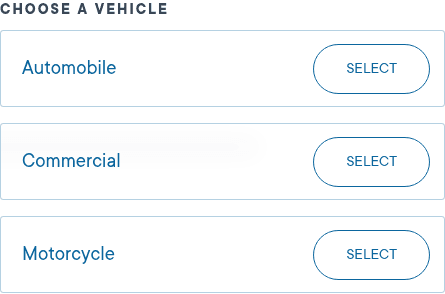
Choose Automobile
Open DMV booking(opens in a new tab)Open the DMV scheduler and select Automobile under Choose a vehicle for a car’s behind-the-wheel test. Keep your Bay Cities results open in another tab.
- 2
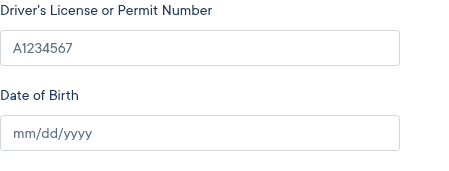
Enter your permit details
On the DMV website, enter your driver’s license or permit number and date of birth. Choose Make an Appointment and follow the eligibility prompts before reserving a car.
- 3
Match your office, date, and test time
Choose the same DMV office, date, and test start time as your Bay Cities results. All times are Pacific.
Use the test time, not pickup time: an 8:30 AM pickup for a 9:00 AM test means booking 9:00 AM with the DMV. If it’s gone, return to your results for another time with a car and instructor.
Same DMV office
Same test date
Same test start time
- 4
Save your DMV confirmation
Complete the DMV prompts until you receive an appointment confirmation. Check the office, date, and time, then save the confirmation number and email or page. Selecting a time on Bay Cities alone does not book the DMV test.
- 5
Reserve your test car
Return to Bay Cities, confirm the exact office, date, and time you booked with the DMV, and choose your pickup.
The DMV test and car rental are separate bookings. Your car is reserved only after you complete the Bay Cities booking and receive confirmation. Availability can change while you book.
Later DMV screens vary by eligibility and availability. Follow the prompts until your appointment is confirmed.
DMV appointment confirmed? Reserve your car.
Return to your test + car results and confirm the office, date, and time. Booked directly with the DMV? Choose “I have a test booked” in our rental search.
Check car rental availabilityNeed help with the DMV booking?
Your time disappeared: check another date or nearby office. If you need our car, check the new appointment against our rental results before booking.
The DMV says you are not eligible: follow its message and resolve your permit or application requirements with the DMV.